Your search, saved, always there when you need it
Configure your filters once, find your documents every session — without ever rebuilding the same search.
Espaces
Nouveauté
25.1
What is it for?
Pristy Espaces user views are saved custom searches — shortcuts to the information you need, accessible in one click from the menu.
Create tailored filters — by space, by folder, by file type, by date or on any property or metadata — give them a name, and find them at every login without reconfiguring anything.
The available criteria cover all common needs:
- Location — target a specific space or folder (or exclude them)
- File type — documents, folders, or any content type
- Dates — creation or modification date, exact value or range
- Properties and metadata — any Alfresco field, with exact, contains or range operators
Results are exportable to CSV and each view can be marked as a favourite for immediate access.
Configure once. Find in one click.
How to use it?
From the Search page, configure your filters then click Save view. Give it a name — it immediately appears in your personal views list.
To relaunch the search, click on the view name: the criteria are reloaded and the results update automatically. You can mark a view as a favourite to find it at the top of the list, modify it at any time or delete it if it is no longer needed.
Administrators can also create shared views, available to all users from the moment they log in.
When should you use it?
Ideal if you regularly consult the same types of documents: active tenders, quarterly deliberations, files from a particular department…
A few concrete examples:
- Public procurement officer — A “Active tenders” view: all active DCEs filtered by space and status, accessible from the menu without reconfiguring filters.
- Director’s secretary — A “Quarterly deliberations” view: filtered by document type and period, always up to date at each session.
- HR department — A dedicated view for contracts expiring within the next 30 days.
- Administrator — Preconfigured shared views by job profile, available from login for the entire team.
No more rebuilding the same filters every session.
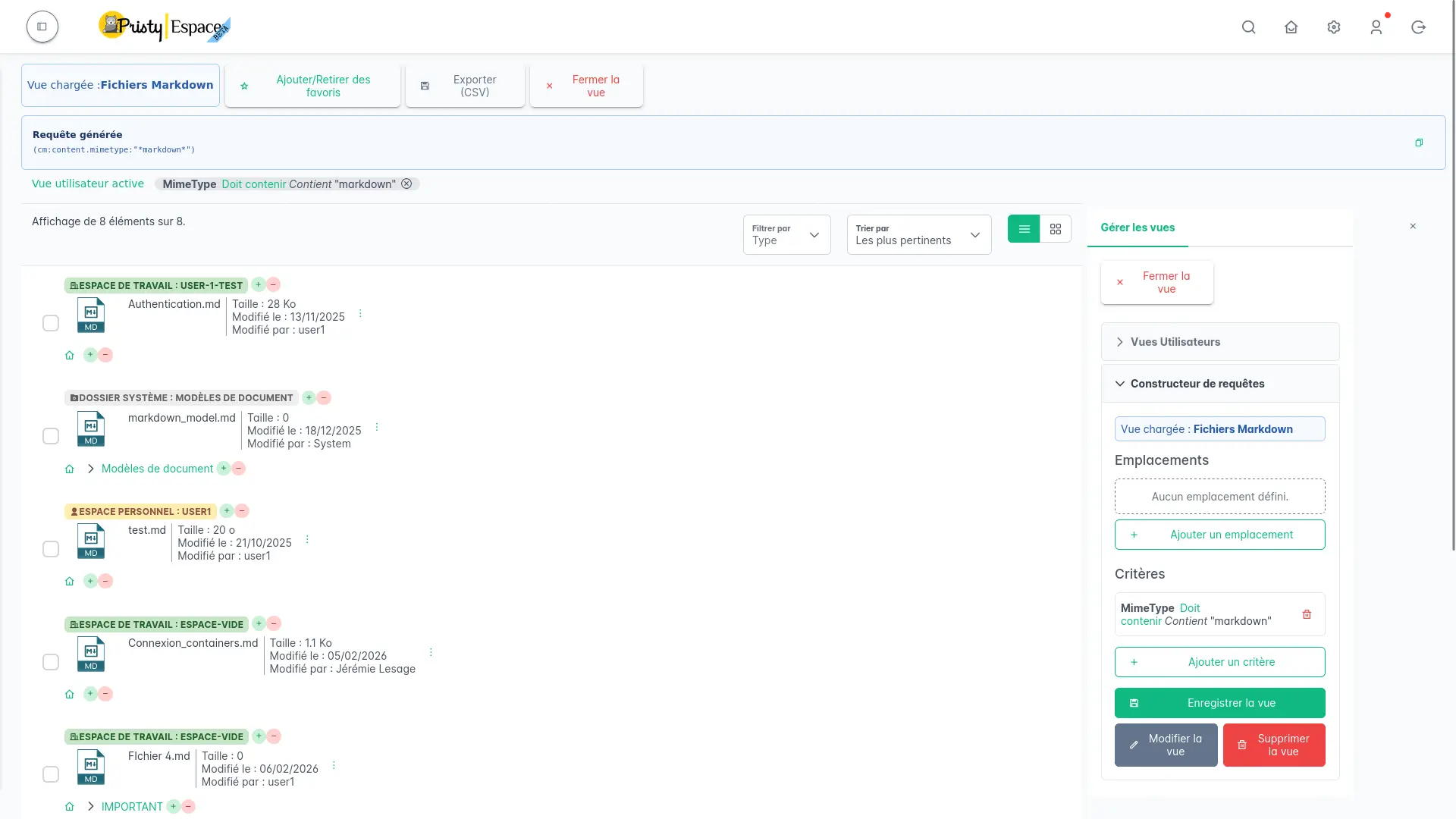
How does it boost productivity?
No more repetitive searches. Your custom views become shortcuts to the information that matters to you. In a few clicks, you have exactly what you need in front of you — no navigation, no filter entry each time.
For teams managing large volumes or very varied document types, it is also an organisational asset: shared views defined by the administrator give each profile a consistent, immediately operational entry point.
Frequently asked questions
Can views be shared with the whole team?
Yes. Administrators can create shared views, available to all users from login. Each user can also create their own personal views, and share a view with a colleague via its URL link.
Can a saved view be modified or deleted?
Yes. From the personal views list, you can modify a view’s criteria, rename it, mark it as a favourite or delete it at any time.
What criteria can be used in a view?
Views support a wide range of criteria: location (space or folder, with exclusion option), file type, creation or modification dates (exact value or range), and any Alfresco property or metadata — with exact, contains or range operators depending on the field type.
Other recent features
- PDF consultation — Consultez vos pdfs facilement, qu'ils contiennent 2 ou 650 pages.
- Administration tools — Manage Alfresco data models, browse the repository and supervise your platform from Pristy Portail — no server access, no command line.
- Classification plan — Automatically structure your workspaces with the Pristy Espaces classification plan. Define document types and folder hierarchy — Pristy classifies on deposit, without interrupting activity.
- Customisable dashboard — Access what matters most from the moment you log in with the customisable dashboard in Pristy Portail. Profile-based home pages, configurable blocks, personalised by each user.
- PDF editing tools — Edit your PDFs without leaving Pristy — reorder pages, redact, merge, sign. Directly from the viewer, versioned automatically.
Planned developments for this feature
There is always room for improvement! Here is what we have planned for the future of this feature:
- Advanced logic: combine multiple locations with OR / NOT operators
How to get Pristy
Order Pristy today and benefit from modern, intuitive document management
Pristy also includes Pristy Portal application that offers profile and user pages. Pristy Portail is included with the purchase of Pristy Actes and Pristy Espaces (solo or together). Pristy Portail can also be purchased on its own.
Go to our rates page to find out more. Request your quote now and take advantage of our low rates and the chance to give your opinion on future features!